


HTTPS, SSL and TLS FAQs
There are sometimes cases of misunderstanding SSL or misinterpreting certain aspects of it. Therefore I made these FAQs from the very basics, which may clear out any confusion.
1. What is SSL?
SSL stands for Secure Sockets Layer, a protocol used to encrypt and authenticate data transmitted between applications, such as a browser and a web server.
2. Where did SSL come from?
SSL version 1.0 was developed by Netscape in the early 1990s. But due to security flaws, it was never published. The first public release was SSL 2.0, which came out in February 1995. It was an improved version, but still, after a complete redesign, version 3.0 got approved.
3. What is its purpose?
The SSL protocol prevents attackers from reading and modifying transactions and messages between the browser and the server, for example, the transfer of credit card data, logins, etc. This ensures that all data remains confidential and protected.
4. What is TLS-certificate?
TLS stands for Transport Layer Security - the successor and improved version of SSL. It has more reliable encryption algorithms, but despite some similarities, it is considered to be a different standard.
5. What protocols and versions are used nowadays?
SSL, surprisingly, is not used now. As described above, there were 3 versions (1.0, 2.0, and 3.0) initially. Then based on SSL 3.0 they created the TLS 1.0 protocol. Then TLS got upgraded to 1.1, 1.2, and 1.3 came out. Currently, only the last two are used.
6. How does an SSL certificate operate?
When the browser is connected to the site, an "SSL handshake" occurs ("handshake" keys are created), then cryptographic data is exchanged and, in the end, session keys are formed, on the basis of which the traffic is encrypted.
7. What types of certificates do exist and what's the difference between those?
- SSC (Self-Signed Certificate) - you can create yourself, but there is no trust
- SGC (Server Gated Cryptography) - for very old browsers
- SAN/UCC (Unified Communications Certificates) - multi-domain for MS Exchange
- Code Signing - for software signing
- Wildcard SSL Certificate - for domain and subdomains
- DV (Domain Validation) - confirms the domain name
- OV (Organisation Validation) - checking organization, address, and location
- EV (Extended validation) - gives the most protection
8. Are there any other types available?
Yes, for example, a Multi-Domain SSL certificate for several domains - does not require the purchase of certificates for each individual domain which simplifies administration. Code Signing certificates are designed to protect your code, content, and other files while they are being transferred online.
9. What data is stored inside of SSL certificate?
SSL certificate contains information:
- Version
- Serial number
- Search Algorithm ID
- Publisher name
- Validity period (no earlier than / no later)
- The subject of the certificate
- Subject's public key information
- Unique identifier of the publisher
- Subject unique identifier
- Add-ons
- Signature
10. Are SSL and HTTPS actually the same thing?
No, they aren't.
SSL is a security protocol used to establish a secure connection between a web browser and a web server.
HTTPS works as a sublevel between applications. HTTPS encrypts a regular HTTP message before sending and decrypts it during delivery.
11. How do I verify if a site uses SSL/HTTPS and it is correct?
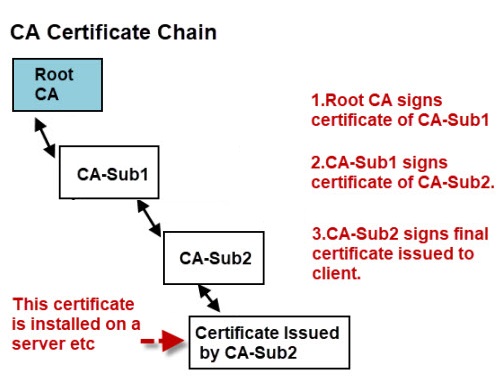
Most browsers display a padlock and/or message at the address bar to mark secure connections protected by SSL / TLS certificates. The computer OS maintains a list of root certificates that make up a chain of trust.
12. What is a Chain of Trust?
When opening a site, the browser checks the entire chain of certificates, up to the root. If even one of the certificates is invalid, then the entire chain is also considered invalid.
12. Why SSL certificates are that expensive?
SSL certificates can be viewed as a kind of and insurance, they are expensive due to the guarantees that come with them. If something goes wrong, the SSL Certificate Provider will pay the affected end user an insurance premium.
13. Are there free certificates and how secure are they?
Free certificates do exist, perform the same function as paid ones, but usually have the lowest security level (DV), there will probably not be a guarantee for it, i.e. they are safe to some extent. When threatened, your site visitors will not be able to claim a guarantee. The most known free certificates provider is Let's Encrypt.
14. What is the way of buying a certificate?
If your hosting provider does not offer any free SSL certificates, or you need a different type of certificate, you can purchase your own certificate from a Certification Authority or a discounted reseller, which will be cheaper.
15. What is a Certificate Authority then?
Certificate Authority (CA) - an international organization that issues and is responsible for SSL certificates. CA verifies the domains and sources that authenticate organizations. Certification authorities are trusted by 99% of browsers.
16. What is the process for obtaining a certificate upon payment completion?
First, you generate a CSR and a private key. Then you send the CSR to the Certification Authority (CA) and get an archive with text/binaries for different types of web servers. Then you install it on your hosting or your server.
17. How do I use an SSL / TLS certificate?
- Deploy your site on the hosting provider's server.
- Create a CSR - Certificate Request, buy a certificate from a trusted CA or reseller.
- Install SSL / TLS certificate in the hosting control panel or on the server.
- Create a redirect to the protected version of the site - HTTPS.
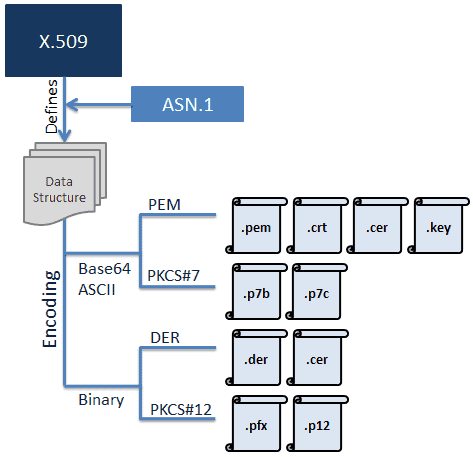
- PEM. Most Certificate Authorities provide certificates in PEM format in Base64 ASCII encoded files. The certificate file types can be .pem, .crt, .cer, or .key. Because of this, .pem file can include the server certificate, the intermediate certificate, and the private key in a single file. The server certificate and intermediate certificate can also be in a separate .crt or .cer file. The private key can be in a .key file. The actual data is located between the
---- BEGIN CERTIFICATE----and----END CERTIFICATE----statements, a similar approach for key and certificate requests. - PKCS#7 also use Base64 ASCII encoding with file extension .p7b or .p7c. Only certificates can be stored in this format, not private keys. The P7B certificates are contained between the
-----BEGIN PKCS7-----and-----END PKCS7-----statements. - DER certificates are provided in a binary form, contained in .der or .cer files. These certificates are mainly used in Java-based web servers.
- PKCS#12 also use binary form for the data, contained in .pfx or .p12 files. However, it can store the server certificate, the intermediate certificate, and the private key in a single .pfx file with password protection. These certificates are mainly used on the Windows platform.